APEX 23.1 Push Notifications - an exciting new PWA addition

As soon as I heard that version 23.1 of APEX is now available at apex.oracle.com, I knew it will be a good one. One of the most intriguing features is of course Declarative PWA Push Notifications - a new feature in the PWA feature set, started several releases ago.
I have now added Push notifications to one of my personal apps on apex.oracle.com. Setup is very quick and straightforward and it works wonderfully. There is a PL/SQL API for sending push notifications, checking the queue of sent notifications and their status, checking the subscribers' list, etc. API is not public yet but will be announced once 23.1 goes official. Declarative Push Notifications solve a problem, which I have been circumventing using third-party APIs (and lots of custom JS code).
They are available for all major browsers and operating systems (including iOS since version 16.4). And few important things to note:
Notifications are sent per user per device.
The API allows sending notifications to a specific user. To send a message to all users, you need to loop through them.
The API allows setting custom Icons, Links, Titles and Body of the notification. The icon is automatically set to be the App icon if not specified.
To get Push Notifications on your iOS device, you need to have version 16.4 or later (websites are now able to start sending iOS push notifications, not only on Safari, but also to other browsers such as Chrome and Firefox).
Read more information here - https://web.dev/push-notifications-in-all-modern-browsers/
You get the Push Notifications delivered by a different endpoint, depending on the browser you have subscribed from. So to have them working, you need an internet connection. If used in an intranet environment, you need to enable the inbound traffic for these endpoints.
Enable Push Notifications on new Apps
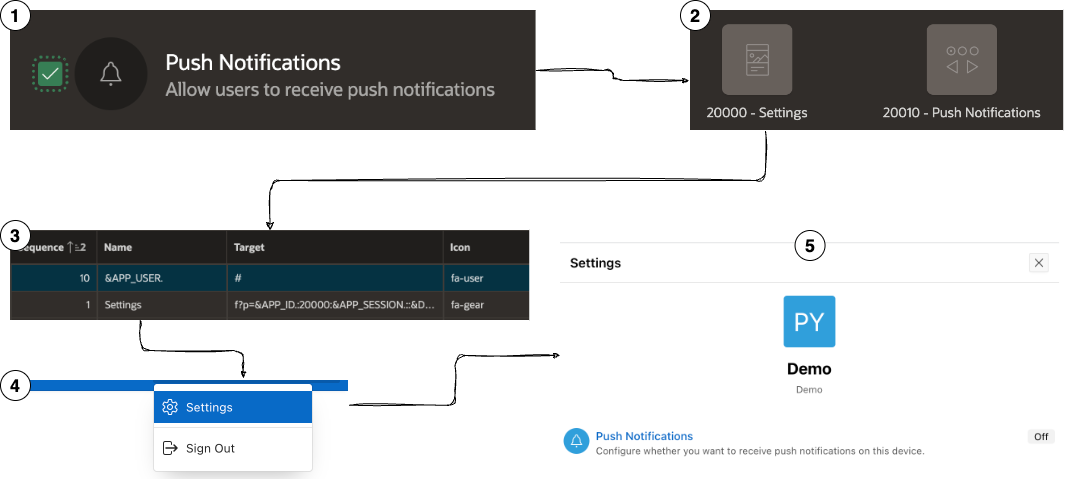
On the
Create a New Applicationwizard, check the Push Notifications option.After the App is created, you will have two pages among others -
20000 - Settingsand20010 - Push NotificationsYou will also have a
Navigation Barentry named SettingsThis entry is available in your App under the User menu item.
Clicking it opens page
20000 - Settingswhich is a Modal Dialog using a Drawer template.
Enable Push Notifications in existing Apps
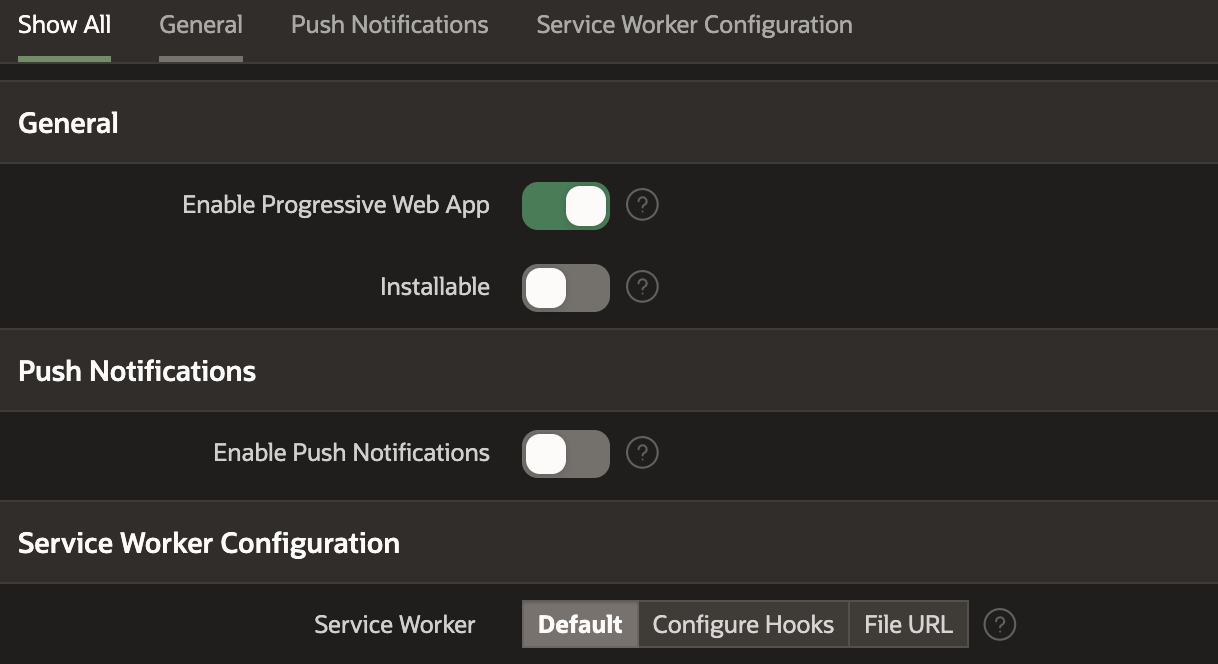
If you have an existing Application and want to enable Push Notifications for it, go to
Shared Components->Progressive Web Appand just activate the Enable Push Notifications option. This will create pages20000 - Settingsand20010 - Push Notifications, just like for a new App. What you need to do manually is create a Navigation Bar item, a button or other link that triggers the opening of page20000 - Settings.
The process of allowing Push Notifications
After opening
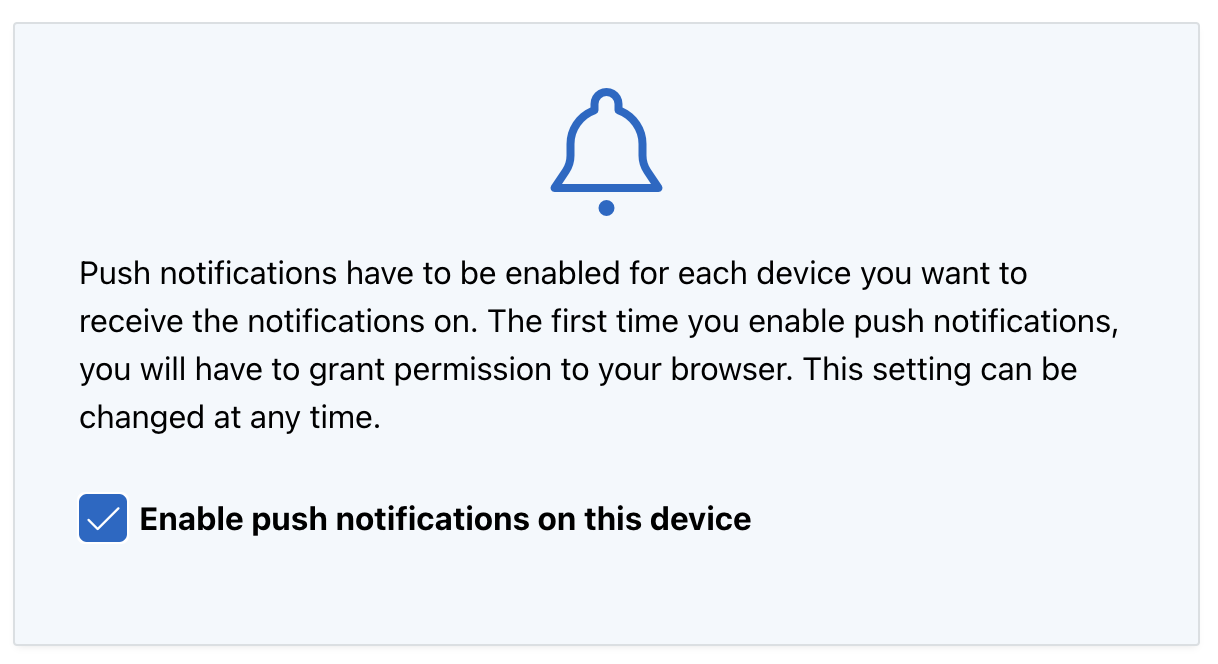
Settings, what the user needs to do next is click on Push Notifications list item. He will be taken to a new page20010 - Push Notificationswhere Enable push notifications on this device option should be checked
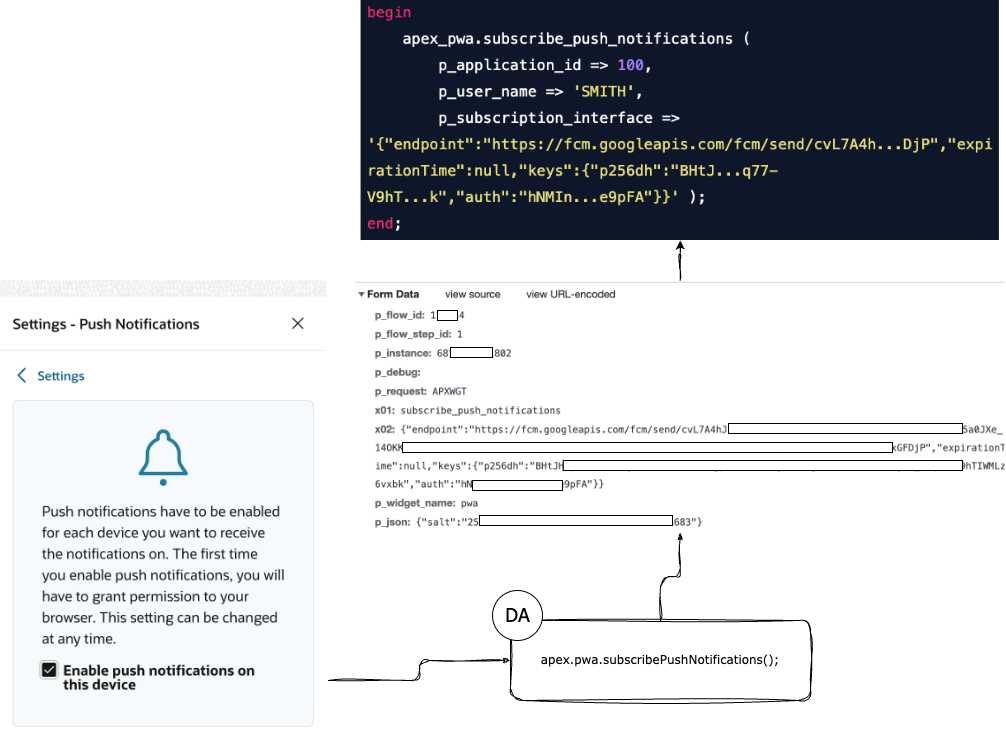
The chart below shows what happens when the checkbox is checked and the user agrees that the browser can start sending Push Notifications.
Sending Push Notifications to a user
🔸 Notifications are sent per user per device.
🔸 The API allows sending notifications to a specific user. To send a message to all users, you need to loop through them.
🔸 Push notifications are put in a queue, which is then used to send the individual notifications
🔸 The notification calls in the queue are executed every 2 minutes
🔸 If the call fails, it is retried, as the interval is increased for each consecutive try
🔸 A list of all subscribed users and subscription interfaces can be found using theAPEX_APPL_PUSH_SUBSCRIPTIONSview.
🔸 A list of all users' notifications in the queue can be found using theAPEX_PUSH_NOTIFICATIONS_QUEUEview.
🔸 To check if a specific user has a Push Notifications subscription, use theapex_pwa.has_push_subscriptionmethod, described below.
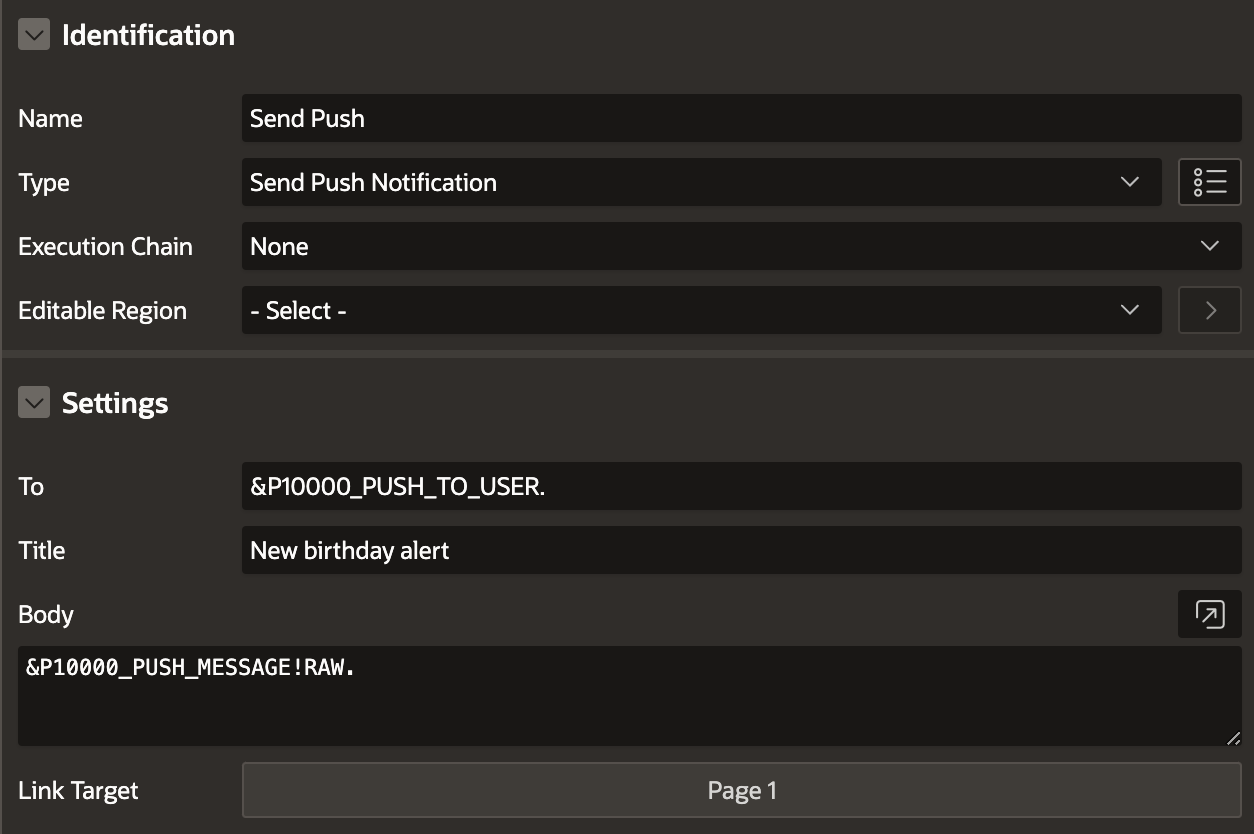
-- The following will send a Push Notification to the specified user (:P100000_PUSH_TO_USER), using the specified message (:P100000_PUSH_MESSAGE) and will the URL as a link
begin
    apex_pwa.send_push_notification (
        p_application_id => 100,
        p_user_name      => :P100000_PUSH_TO_USER,
        p_title          => 'New birthday alert',
        p_body           => :P100000_PUSH_MESSAGE,
        p_target_url     => apex_util.host_url||
                 apex_page.get_url( p_application => 100,
                                    p_page   => 'person_details',
                                    p_items  => 'p1_person_id',
                                    p_values => :PERSON_ID )
     );
end;
p_url requires the full URL to your Application page. That's why apex_util.host_url is used to form it in the example above.
For best results when linking users to your App using the Push Notification,Deep LinkingorRejoin Sessionshould be enabled at the application level.
The APEX_PWA API
The
APEX_PWAAPI is available at apex.oracle.com on APEX 23.1 version. There is no official documentation yet. It will be available together with the release. The below procedures, although not likely, might change by the time of public release.Follow https://apex.oracle.com/en/learn/documentation/ for official documentation and API usage.
This package is used to provide utilities to applications that have enabled Progressive Web App such as:
Subscribing and unsubscribing users for push notifications.
Verifying subscription for push notifications.
Sending push notifications to subscribed users.
Manually triggering all Push Notifications in the queue to be sent
apex_pwa.has_push_subscription
-- function apex_pwa.has_push_subscription
-- Verify if user SMITH has a push subscription for application 100.
declare
    l_is_subscribed boolean;
begin
    l_is_subscribed :=
    apex_pwa.has_push_subscription (
        p_application_id => 100,
        p_user_name => 'SMITH' );
end;
apex_pwa.subscribe_push_notifications
-- procedure apex_pwa.subscribe_push_notifications
-- Subscribes a user to push notifications. This is usually used in conjunction with APEX JavaScript API apex.pwa.subscribePushNotifications and apex.pwa.getPushSubscription that can generate the subscription object.
-- '{ "endpoint": "", "expirationTime": null, "keys": { "p256dh": "", "auth": "" } }'
begin
    apex_pwa.subscribe_push_notifications (
        p_application_id => 100,
        p_user_name => 'SMITH',
        p_subscription_interface => '{"endpoint":"https://fcm.googleapis.com/fcm/send/cvL7A4h...DjP","expirationTime":null,"keys":{"p256dh":"BHtJ...q77-V9hT...k","auth":"hNMIn...e9pFA"}}' );
end;
apex_pwa.unsubscribe_push_notifications
-- procedure apex_pwa.unsubscribe_push_notifications
-- Unsubscribes a user from push notifications. This is usually used in conjunction with APEX JavaScript API apex.pwa.unsubscribePushNotifications and apex.pwa.getPushSubscription that can generate the subscription object.
-- '{ "endpoint": "", "expirationTime": null, "keys": { "p256dh": "", "auth": "" } }'
begin
    apex_pwa.unsubscribe_push_notifications (
        p_application_id => 100,
        p_user_name => 'SMITH',
        p_subscription_interface => '{"endpoint":"https://fcm.googleapis.com/fcm/send/cvL7A4h...DjP","expirationTime":null,"keys":{"p256dh":"BHtJ...q77-V9hT...k","auth":"hNMIn...e9pFA"}}' );
end;

begin
    -- if no parameters are provided, APEX uses the logged-in user information as a default
    -- if p_subscription_interface is provided, it will only unsubscribe this subscription.
    -- if p_subscription_interface is not provided, it will unsubscribe all subscriptions.
    apex_pwa.unsubscribe_push_notifications;
end;
apex_pwa.send_push_notification
-- procedure apex_pwa.send_push_notification
-- Sends a push notification to the specified user in the specified application. All devices that the user subscribed to will receive the push notification.
-- p_target_url URL of the page that will be opened when the user clicks on the push notification. This works better when deep linking is enabled or rejoin session is enabled on the application. Defaults to the home page of the application.
procedure send_push_notification (
    p_application_id in number default wwv_flow_security.g_flow_id,
    p_user_name in varchar2,
    p_title in varchar2,
    p_body in varchar2 default null,
    p_icon_url in varchar2 default null,
    p_target_url in varchar2 default null );

begin
    apex_pwa.send_push_notification (
        p_application_id => 100,
        p_user_name => 'SMITH',
        p_title => 'New birthday alert',
        p_body => 'Your friend Plamen is celebrating a birthday today! Send best wishes!',
        p_target_url => apex_util.host_url||
                 apex_page.get_url( p_application => 100,
                                    p_page   => 'person_details',
                                    p_items  => 'p5_person_id',
                                    p_values => :PERSON_ID )
     );
end;
apex_pwa.push_queue
-- procedure apex_pwa.push_queue
-- Triggers the database job to send all push notifications in the queue.
begin
    apex_pwa.push_queue;
end;
apex_pwa.generate_push_credentials
-- procedure apex_pwa.generate_push_credentials
-- Regenerate push credential keys for selected application.
begin
    apex_pwa.generate_push_credentials (
        p_application_id => 100 );
end;
Follow me
Like that post? Follow me on Twitter and LinkedIn!
🔷 @plamen_9 on Twitter
🔷 Plamen Mushkov on LinkedIn
About the author
Creating apps built with ❤️ using Oracle APEX. PL/SQL dev. Exploring the AI and ML world. Keen on front-end, visual arts and new technologies. Love travel, sports, photography.
Comments
Join the discussionHey, Plamen. I have a question about sending the push notification from the server. Im sending with the p_target_url, to a page on my app passing a item value, but i can't keep the session state if the user is already logged on, is there any way i could do this? Would be great if you could help me! Thanks!
Did you use apex_page.get_url to generate the URL? Also, check the following settings in your app/page which might prevent you from reusing the existing session:
Deep Linking = Enabled
Rejoin Sessions = Enabled for All Sessions
Page Protection = Arguments Must Have Checksum
If you use the new Send Push Notification process, I believe APEX will handle the session for you.
Plamen Mushkov Even using the direct link, or the apex_page.get_url it still shutting down the session, already have these options enabled, but 'Rejoin Sessions' are Enabled For Public Sessions, can't change to all sessions due to application restriction. Already tried to use the get session function too, but didn't work.